
Table of Contents
- Why Homeowners Replace Traditional Keyed Deadbolts
- Smart Locks vs. Traditional Deadbolts: Key Differences
- Keypad Door Locks and Electronic Access
- Smart Deadbolt Security: What You Need to Know
- Rekeying a Deadbolt vs. Upgrading to New Hardware
- Comparing Your Options: Cost, Security, and Convenience
- Which Alternative to Traditional Deadbolts Is Right for You?
- Frequently Asked Questions
Last Updated: October 10, 2026
Why Homeowners Replace Traditional Keyed Deadbolts
Traditional keyed deadbolts have served homeowners for decades, but alternatives to traditional keyed deadbolts are becoming increasingly attractive as technology advances. At Flatirons Locksmiths, we help homeowners in the north metro Denver area understand why they’re making the switch.
The primary reason homeowners seek alternatives to traditional keyed deadbolts is convenience. Fumbling for keys in the dark, losing them, or worrying about whether you locked the door creates daily friction. Keypad locks eliminate keys entirely, while smart locks add remote access and temporary codes for guests.
Security is another driver. Modern alternatives offer audit trails, temporary access codes, and alarm integration. High-security deadbolts provide forced-entry resistance that standard locks don’t.
Rekeying costs less than replacement and works when you simply need to change access. But if you’re upgrading, alternatives offer more flexibility and control.
Smart Locks vs. Traditional Deadbolts: Key Differences
Smart locks use electronic mechanisms, keypads, or mobile apps to control access, while traditional deadbolts rely on a physical key.
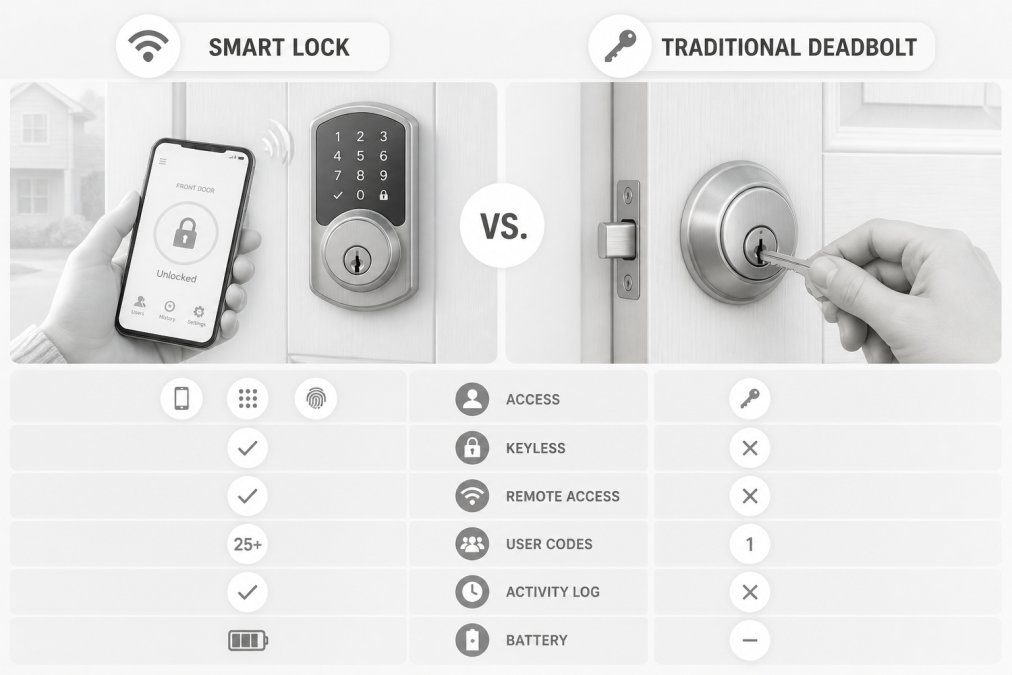
Traditional deadbolts are purely mechanical, affecting daily use and maintenance.
Smart locks excel at access management: temporary codes, notifications, and remote control. Traditional deadbolts have no batteries to fail and work during power outages.
Smart locks often retrofit onto existing doors; some require professional installation. Traditional deadbolts are simpler to install but less flexible.
Keypad Door Locks and Electronic Access
Keypad locks use a numeric code instead of a physical key.
Keypad locks appeal to people who lose keys or prefer code entry, and work well for shared spaces needing temporary access.
Battery life is the primary consideration: most keypad locks run 12-18 months on AA or AAA batteries. Unlike smart locks, they don’t require Wi-Fi, making them reliable in poor connectivity areas, but they lack remote access and notifications.
Installation is usually straightforward, replacing existing deadbolts without door modifications. Flatirons Locksmiths can assess your door and recommend the best option.
Smart Deadbolt Security: What You Need to Know
Smart deadbolts introduce security considerations that traditional locks don’t have. Understanding failure modes and backup plans is essential.
Hacking and Digital Security
Remote compromise is the most common concern. Modern smart locks use AES-128 encryption or stronger, making brute-force attacks infeasible. However, digital security depends on the manufacturer’s implementation.
Physical Security and Forced Entry
A smart lock is only as secure as the door itself. ANSI/BHMA Grade 1 deadbolts resist forced entry far better than Grade 2 or Grade 3.
Battery Failure and Backup Entry
When a smart lock’s battery dies, remote unlocking becomes impossible. Quality smart locks include backup entry methods.
Battery life typically ranges from 12-18 months. Most smart locks send low-battery alerts weeks in advance. Test your backup entry method twice per year.
Power Outages and Extended Downtime
Smart locks may become inoperable during extended outages if backup batteries drain. A typical smart lock sustains 50-100 unlock cycles without external power.
Connectivity Loss and Offline Operation
If Wi-Fi fails, most smart locks continue to operate locally via Bluetooth or keypad code, but you lose remote access. Avoid cloud-dependent locks; verify offline operation before purchase.
Maintenance and Software Updates
Smart locks require periodic software updates. Check the manufacturer’s update history: locks with regular patches (quarterly or more frequent) indicate active security management.
Rekeying a Deadbolt vs. Upgrading to New Hardware
When you need to change access, you can rekey your existing deadbolt (changing internal pins so old keys no longer work) or replace it entirely. Rekeying is the most economical option if your existing deadbolt is in good condition.
Upgrading means installing a completely different lock. This makes sense if your current deadbolt is damaged, outdated, or if you want keypad entry or smart lock capabilities.
Rekeying is faster and cheaper than replacement and takes under an hour. However, it only changes the key and doesn’t improve security features or add functionality.
Upgrading lets you choose a lock matching your needs. If you want temporary guest codes, remote access, or higher security ratings, new hardware offers alternatives to traditional keyed deadbolts: smart locks, keypad locks, or high-security mechanical deadbolts.
Comparing Your Options: Cost, Security, and Convenience
Feature and Security Comparison
| Option | Security Level | Convenience | Typical Use Case |
|---|---|---|---|
| Traditional Keyed Deadbolt | Standard (Grade 2-3) | Low (requires key) | Budget-conscious, power-outage reliability, rental properties |
| Keypad Lock | Standard to High (Grade 2-3) | High (code entry, no key) | Shared access, temporary guests, areas with poor Wi-Fi |
| Smart Deadbolt | High (Grade 2, with audit trail) | Very High (app + code + remote) | Tech-forward, remote access needed, frequent guest access |
| High-Security Mechanical | Very High (Grade 1) | Low (key only) | Maximum forced-entry resistance, commercial or high-risk properties |
Most residential smart locks are Grade 2, which is adequate for typical homes but less resistant than Grade 1 mechanical deadbolts. However, a Grade 2 smart lock with audit trails and temporary codes offers superior access control: you know who entered and when, and can revoke access remotely.
Total Cost of Ownership
-
Traditional Keyed Deadbolt: Rekey cost, $50-$150 per lock. Replacement cost, $100-$300 for hardware plus installation. No ongoing costs. Expected lifespan, 20+ years.
-
Keypad Lock: Hardware cost, $150-$400. Installation, $0-$100 if DIY, $100-$200 if professional. Batteries (AA or AAA), $5-$10 per set, replaced every 12-18 months. No subscriptions. Expected lifespan, 10-15 years.
-
Smart Deadbolt (Wi-Fi): Hardware cost, $200-$500. Installation, $0-$150 if DIY, $150-$300 if professional. Batteries (if required), $5-$10 per set, replaced every 12-18 months. Optional hub (if not Wi-Fi native), $50-$100. Optional subscription for cloud features, $0-$10/month. Expected lifespan, 7-10 years (shorter than mechanical locks due to electronics).
-
Smart Deadbolt (Bluetooth only, no Wi-Fi): Hardware cost, $200-$400. Installation similar to Wi-Fi models. Batteries and optional hub costs similar. No subscription required if using local Bluetooth. Expected lifespan, 7-10 years.
Over 10 years, a smart lock with a $10/month subscription costs $1,200-$2,000 in subscription fees alone. A keypad lock with battery replacements costs $50-$100 total. For budget-conscious homeowners, the long-term cost difference is significant. For those who value remote access and temporary codes, the smart lock’s convenience may justify the cost.
Privacy and Cybersecurity Threat Model
Smart locks collect data that traditional deadbolts do not. Understanding what data is collected, where it’s stored, and who can access it is essential.
-
Account Security: Your smart lock account is a target. If someone gains access to your account, they can unlock your door remotely. Use a strong, unique password and enable two-factor authentication on your lock’s app. Check your account login history regularly for unauthorized access.
-
Data Collection and Retention: Most smart lock manufacturers collect entry logs (who unlocked the door, when, and how). Some also collect Wi-Fi signal strength, battery level, and app usage patterns. Review the manufacturer’s privacy policy. Ask: How long is entry data retained? Can you delete it? Is it encrypted in transit and at rest? Some manufacturers (like Level) offer local-only operation with no cloud storage; others (like August) require cloud connectivity. Local-only locks offer stronger privacy but fewer remote features.
-
Wireless Vulnerabilities: Bluetooth and Wi-Fi are radio protocols. Theoretically, an attacker within range could intercept communications. Modern locks use encryption to prevent this, but older or poorly implemented locks may be vulnerable. Research the specific lock model’s security history before purchase. Check whether the manufacturer has published security audits or received third-party testing.
-
Software Updates and Abandonment: If a manufacturer stops supporting a lock with security updates, vulnerabilities may accumulate. A lock abandoned after 3-5 years of support is a liability. Choose manufacturers with a track record of long-term support (5+ years) and regular updates (at least quarterly).
-
Local Versus Cloud Control: Locks that require internet connectivity to function are riskier than those that work locally via Bluetooth or keypad. If the manufacturer’s servers go down, you lose remote access (though local access remains). If the company goes out of business, you may lose app functionality. Locks with local operation (Bluetooth keypad, or mechanical override) are more resilient.
Convenience is Subjective
Some people value the simplicity of a traditional key. Others find the friction of carrying keys frustrating enough to justify upgrading.
For most homeowners, a smart deadbolt offers the best balance of security, convenience, and access control. For those prioritizing maximum forced-entry resistance and privacy (no cloud connectivity), a Grade 1 mechanical deadbolt is the answer.
Which Alternative to Traditional Deadbolts Is Right for You?
Choosing among alternatives to traditional keyed deadbolts depends on your priorities. Start by asking: What problem are you solving?
If you’re locked out frequently or lose keys regularly, a keypad lock eliminates that friction immediately.
Consider your door type and installation requirements. Not all locks fit all doors. A retrofit smart lock works on existing single-cylinder deadbolts, making it an easy upgrade. A full replacement requires more involved installation.
Think about long-term maintenance. Smart locks require battery replacement and software updates. Traditional deadbolts require occasional lubrication but little else. Keypad locks fall between these extremes, battery-dependent but mechanically simple.
Budget matters. A basic rekey costs significantly less than a smart lock installation.
For most homeowners, a smart deadbolt offers the best balance of security, convenience, and long-term value. For those prioritizing maximum forced-entry resistance, a high-security mechanical deadbolt is the answer. For those seeking the simplest upgrade path, rekeying an existing deadbolt remains a solid choice.
If you’re uncertain which alternative to traditional keyed deadbolts fits your home, Flatirons Locksmiths can help you evaluate your options. Our team provides upfront quotes before any work begins, and we’re available for both emergency and scheduled service throughout the north metro Denver area. Contact Flatirons Locksmiths to schedule a consultation and upgrade your home security today.
Frequently Asked Questions
Are smart deadbolts as secure as traditional keyed deadbolts?
Smart deadbolts offer comparable security to traditional deadbolts when they meet ANSI/BHMA Grade 1 or Grade 2 standards for forced-entry resistance. The main security difference lies in the access method: smart locks use electronic credentials (codes, biometric data, apps) instead of physical keys, which eliminates key-copying vulnerabilities but introduces cybersecurity considerations. Both types protect against bump attacks and lock picking when properly installed. Your choice depends on whether you prioritize the physical security of a keyed lock or the access control flexibility of a smart lock.
What happens to a smart lock during a power outage?
Most smart deadbolts include battery backup and a manual key override, allowing you to unlock the door even if the batteries die or Wi-Fi fails. Battery life typically ranges from several months to over a year, depending on usage frequency. Some models also support a physical keypad that works without Wi-Fi connectivity. Before installing a smart lock, verify that your chosen model includes both battery backup and a manual override option to ensure you won’t be locked out if the system fails.
How does rekeying a deadbolt compare to replacing it with a smart lock?
Rekeying a deadbolt changes the internal lock cylinder so existing keys no longer work, making it an affordable way to regain security after moving into a new home or losing keys. Replacing a traditional deadbolt with a smart lock or keypad lock adds keyless entry and remote access but requires removing the old hardware and installing new mechanisms. Rekeying costs less upfront and preserves your existing deadbolt, while replacing it offers convenience and access-management features. Many homeowners rekey initially, then upgrade to smart locks later as part of a broader security improvement.
Can keypad locks be opened without entering the correct code?
Keypad locks (both electronic deadbolts and retrofit keypads) protect against unauthorized entry through forced entry and lock manipulation just like traditional deadbolts, provided they meet ANSI/BHMA security grades. However, electronic keypads can be vulnerable to code-sharing if temporary access codes are not regularly updated or revoked. The physical security rating of the lock itself, its resistance to picking, bumping, and forced entry, depends on the manufacturer’s design and grade rating, not the keypad feature. Always choose locks rated Grade 1 or Grade 2 for maximum resistance to forced entry.
What’s the total cost of ownership for smart locks versus traditional deadbolts?
Traditional keyed deadbolts have low upfront costs but may require rekeying ($50-$200 per lock) if keys are lost or you move to a new home. Smart locks cost more initially but eliminate rekeying expenses and offer long-term value through access management and convenience. Consider battery replacement costs (typically $10-$30 per lock annually), potential professional installation, and Wi-Fi connectivity fees when calculating total ownership costs. For specific pricing on installation and hardware options, contact a local locksmith for a transparent quote tailored to your needs.