
Table of Contents
- Smart Lock vs Traditional Deadbolt: The Core Differences
- Security Vulnerabilities: What You Need to Know
- ANSI Grade Deadbolt Ratings and Standards
- Smart Lock Installation Cost and Budget Planning
- Benefits of Professional Locksmith Installation
- Practical Considerations: Battery Life, Firmware, and Maintenance
- Making Your Decision: Which Option Works for You
- Frequently Asked Questions
Last Updated: September 28, 2026
Smart Lock vs Traditional Deadbolt: The Core Differences
A smart lock vs traditional deadbolt comparison requires understanding how each protects your home and what trade-offs come with that protection.
Traditional deadbolts are mechanical devices with a bolt that extends into the door frame. No batteries, no WiFi, no firmware updates, just turn a key and the bolt moves.
Smart locks add keyless entry via keypads, biometric authentication, or remote app access. Models like the Schlage Arrive combine deadbolt durability with connectivity; the Yale Assure Lock 2 prioritizes compact design and multiple entry methods.
The choice depends on your priorities: mechanical reliability versus digital convenience, upfront cost versus long-term management, and physical security versus remote access.
Security Vulnerabilities: What You Need to Know
Both smart locks and traditional deadbolts have vulnerabilities. Understanding them helps you make an informed decision rather than assuming one is simply “more secure.”
Digital Attack Vectors and Encryption
Smart locks depend on encryption to protect access data and remote commands, creating digital vulnerabilities that mechanical deadbolts don’t face. A traditional deadbolt requires physical access to attack.
WiFi-enabled models transmit data across networks, creating entry points if encryption is weak or firmware isn’t updated. Bluetooth locks face jamming or replay attacks; keypads can be compromised if codes are simple or shared widely.
Quality models like the Eufy Smart Touch Lock use strong encryption and regular updates. The key is choosing a reputable manufacturer and staying current with firmware.
Physical Security and Mechanical Failure
A deadbolt rated ANSI Grade 1 resists forced entry through mechanical strength, with the bolt extending deep into the frame and hardware built to withstand significant force.
Mechanical failure can occur: deadbolts jam, freeze in cold weather, or wear out. Keys break; strike plates weaken. These are wear-and-tear issues, not digital vulnerabilities.
Smart locks add mechanical complexity with electronic components that can fail. A dead battery or failed motor locks you out. These failures are additional points of failure to consider.
ANSI Grade Deadbolt Ratings and Standards
Understanding ANSI grading is essential when comparing deadbolts. ANSI (American National Standards Institute) rates residential deadbolts on three levels based on their resistance to forced entry.
ANSI Grade 1 is the highest standard, resisting 5 minutes of direct attack with common tools. Grade 1 is the minimum worth considering for main entry doors.
ANSI Grade 2 resists about 3 minutes of attack and costs less; acceptable for secondary doors.
Smart locks don’t always carry ANSI ratings, but quality models like the Schlage Arrive incorporate Grade 1 mechanical components. Check whether the underlying deadbolt mechanism meets ANSI Grade 1 standards.
The rating matters because it indicates how long the physical lock withstands forced entry. A smart lock with a Grade 3 mechanical component is vulnerable to physical attack regardless of encryption sophistication.
Smart Lock Installation Cost and Budget Planning
Installation cost varies significantly based on the type of lock and whether you hire a professional, but the true cost of ownership extends far beyond hardware and labor.
Hardware and Installation Costs
Traditional deadbolts are straightforward to install in 30-45 minutes. Professional installation costs $95-$150 but ensures proper alignment and strike plate reinforcement, which improves effectiveness.
Smart locks vary: some like the Kwikset SmartCode 913 fit existing holes; others require extensive door work. Professional installation costs $150-$300 depending on complexity and additional hardware needs.
Smart locks require: initial purchase ($200-$400 vs. $50-$150 for traditional); professional installation; annual battery replacement ($10-$20); potential smart home hub ($50-$150); firmware updates and app management.
Factor total cost of ownership over 5-10 years. A cheaper smart lock requiring frequent maintenance may cost more long-term than a higher-quality model.
Insurance and Liability Implications
Your homeowner’s insurance policy may have specific requirements or restrictions related to smart locks, and failing to meet them could void coverage in a break-in.
Insurance Coverage and Smart Locks
Traditional deadbolts rated ANSI Grade 1 are universally accepted by insurers. Smart lock policies vary: some treat them the same if mechanically Grade 1 rated; others require “recognized manufacturers” or impose higher deductibles if not professionally installed.
Before purchasing a smart lock, contact your insurer and ask: “Does my policy cover break-ins with a smart lock as primary entry? Are there restrictions?” Get the answer in writing.
Liability in the Event of a Break-In
If burglarized with a smart lock, insurers may investigate installation quality and firmware updates. Failing to apply security patches could result in claim denial if the break-in exploited a known vulnerability.
Insurance policies include a “duty to mitigate” clause. Neglecting firmware updates could be interpreted as failure to mitigate, giving insurers grounds to deny claims.
Traditional deadbolts eliminate this risk. No firmware updates, no digital vulnerabilities, no maintenance questions. An ANSI Grade 1 deadbolt professionally installed will almost certainly be covered by insurers.
Bottom line is avoid cheap locks from online retailers and invest in a quality lock. Your local locksmith will know what to recommend as they have the most experience with all the locks that run into during installation or lockouts and can tell you what locks are easy for them to defeat and what locks are not. They will also know which locks are good quality and be able to make good recommendations.
Warranty and Manufacturer Support
Many smart lock manufacturers require professional installation to honor warranties. Some void warranties if firmware isn’t updated or if used in extreme weather.
Read warranties carefully: Do they require professional installation?
Total Cost of Ownership Comparison
10-year cost comparison:
Traditional Deadbolt: Hardware ($100) + installation ($125) + maintenance ($50) = $275
Smart Deadbolt: Hardware ($325) + installation ($225) + maintenance ($75) = $625
Making the Budget Decision
Choose traditional if: lowest cost, zero maintenance, maximum insurance compatibility, tight budget. Choose smart if: remote access matters, willing to manage batteries and updates, insurer confirms coverage, can afford higher costs.
Benefits of Professional Locksmith Installation
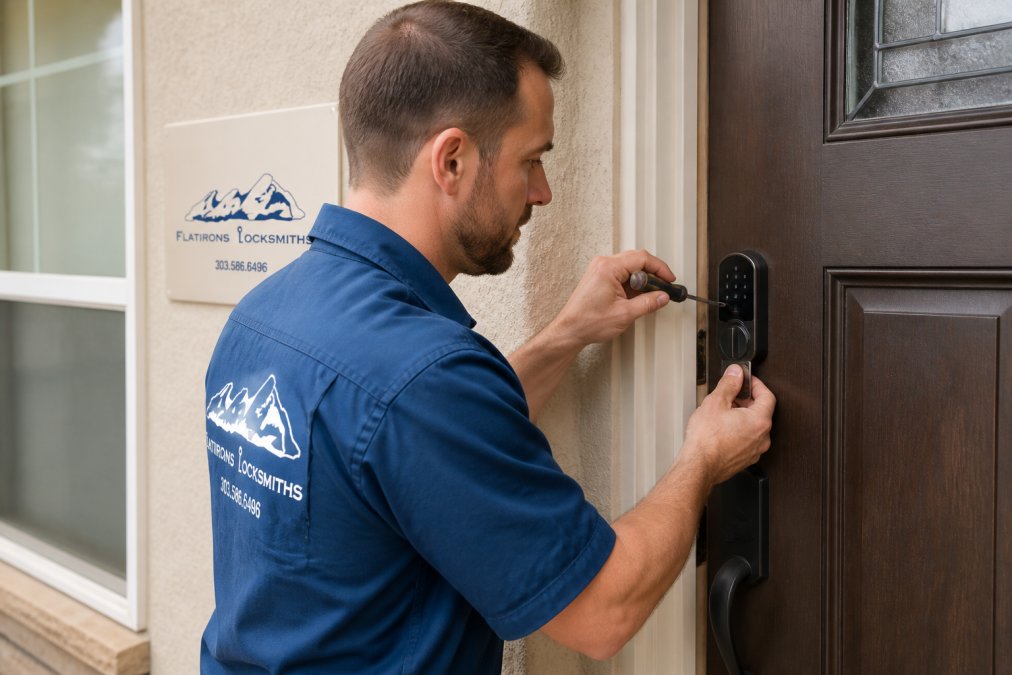
For all deadbolts, a locksmith verifies alignment, reinforces strike plates, and confirms the bolt extends fully. These details separate a lock that works from one that fails under pressure. Most smart locks utilize an electric motor to extend and retract the bold and if the bolt is not aligned properly with the strike it can create a lot of friction and drag on the bolt as it extends and retracts and wear out that motor fast.
Practical Considerations: Battery Life, Firmware, and Maintenance
Smart locks require ongoing maintenance that traditional deadbolts eliminate. Neglecting these responsibilities can undermine security and create liability exposure. This can also cause you to get locked out when the batteries fail.
Battery Life and Contingency Planning
Most smart locks use 4-8 AA or AAA batteries lasting 6-12 months. Some alert you when low; others don’t, leaving you at risk of unexpected lockout.
Firmware Updates and Security Patch Management
Smart lock ownership requires staying current with firmware updates, it’s a security requirement, not optional.
Environmental Durability and Extreme Weather
Smart locks are vulnerable to extreme conditions: freezing temperatures reduce battery performance and can cause jamming; heat and humidity corrode contacts; UV exposure degrades plastic components. Traditional deadbolts function in any temperature or humidity.
Access Logs and Privacy Considerations
Access logs are a unique benefit of smart locks. You can see who entered and when, useful for monitoring contractors, guests, or family members. However, this data is only as secure as your app and cloud storage.
- Where is the data stored? Cloud-based (manufacturer’s servers) or local (your home network)?
- Who has access? Can the manufacturer view your access logs? Can law enforcement request them without a warrant?
- How long is it retained? Some manufacturers delete logs after 30 days; others retain them indefinitely.
- What happens if the company goes out of business? If the manufacturer shuts down, will your lock still function? Will your access logs be deleted or sold?
Maintenance Summary
Traditional deadbolts require minimal maintenance: occasionally lubricate the mechanism, replace the key if it breaks, and ensure the strike plate remains tight. That’s it. No batteries, no updates, no logs to manage, no privacy concerns.
Making Your Decision: Which Option Works for You
The right choice depends on what matters most to you.
Choose a traditional deadbolt if:
- Simplicity and reliability are your priorities
- You want zero ongoing maintenance
- You prefer mechanical security without digital vulnerabilities
- You’re on a tight budget and want lower long-term costs
- You’re renting and need a solution your landlord will accept
Choose a smart lock if:
- Remote access is important (checking if you locked the door, letting guests in remotely)
- You want activity logs and monitoring capabilities
- You’re willing to manage batteries and firmware updates
- You value keyless entry and the convenience of multiple access methods
- You’re integrating with a broader smart home ecosystem
Frequently Asked Questions
Are smart locks as secure as traditional deadbolts?
Smart locks and traditional deadbolts offer different security profiles. Traditional deadbolts rely on physical resistance to force and picking, typically rated ANSI Grade 1 or 2 for residential use. Smart locks add encryption protocols and authentication layers but introduce digital vulnerabilities. A quality smart lock with strong encryption and a mechanical key override can match traditional security when properly installed and maintained. The real difference lies in threat model: smart locks protect against unauthorized digital access and provide remote monitoring, while deadbolts excel at pure physical security. Neither is inherently superior—it depends on your specific security concerns.
What are the main security risks of smart locks?
Smart locks face three primary risk categories: firmware vulnerabilities that hackers can exploit through Wi-Fi or Bluetooth connectivity, battery failure that can lock you out during power loss (though most have mechanical overrides), and access log privacy concerns if your lock records who enters when. Encryption protocols vary by manufacturer—weaker implementations can be compromised. Installation quality matters significantly: poor setup can create bypass opportunities. Regular firmware updates are essential but often neglected by homeowners. Traditional deadbolts avoid digital risks entirely but cannot provide remote access or activity monitoring. The safest approach combines a quality smart lock with strong encryption, regular updates, and a professional installation that includes proper fail-safe configuration.
Do I need a professional for smart lock installation?
While some smart locks are designed for DIY installation, professional installation offers distinct advantages. Locksmiths ensure proper alignment, weatherproofing, and integration with your existing door hardware—mistakes here can compromise both security and functionality. They verify fail-safe settings (so the lock defaults to unlocked during power loss if you choose), test two-factor authentication systems, and confirm encryption protocols are active. Professionals also assess your specific door type, material, and existing deadbolt condition, recommending compatible hardware. For renters or those with retrofit requirements, professionals know which installations won’t damage doors or violate lease terms. DIY installation works for straightforward cases, but professional installation eliminates installation-related vulnerabilities and ensures your lock functions as intended.
What happens to a smart lock during a power outage?
Smart locks operate on battery power, not household electricity, so they function during outages. Most use AA or AAA batteries lasting 6-12 months depending on usage frequency. However, if batteries fully deplete, you’ll need the mechanical key override to enter. Some models include emergency power supply options like USB charging ports. Wi-Fi and Bluetooth connectivity will be lost during an outage, so remote access won’t work, but local keypad entry continues. This is why having a physical key backup is critical. Professional installation includes testing battery life estimates and discussing backup power strategies. Traditional deadbolts have no battery dependence, making them reliable during extended outages—a consideration if you live in areas prone to power disruptions.