
Last Updated: October 24, 2026
Quick Summary
Most smart lock batteries last six months to a year on normal use, though heavy daily traffic, Wi-Fi connectivity, and cold weather push that number down. A quiet front door with Bluetooth-only operation can stretch a set of AA batteries past twelve months.
- Wi-Fi connectivity is the biggest power draw in most smart locks, draining faster than Bluetooth.
- Plan on changing smart lock batteries every six to twelve months, or sooner if the lock warns you.
- Lithium batteries cost more but hold capacity better in cold weather than alkaline.
- Never mix chemistries or ages in the same lock, and swap all cells at once.
- A strike plate a few millimeters off forces the motor to push through resistance every cycle.
Table of Contents
- How Long Do Smart Lock Batteries Last on Average?
- What Drains Smart Lock Batteries: 7 Factors That Matter
- How Often to Change Smart Lock Batteries
- Smart Lock Low Battery Warning: How to Check Battery Status
- Best Batteries for Smart Locks: Alkaline vs Lithium
- How to Make Smart Lock Batteries Last Longer
- Troubleshooting Unusually Fast Battery Drain
- Book a Smart Lock Battery and Hardware Check
- Frequently Asked Questions
How Long Do Smart Lock Batteries Last on Average?
Most smart lock batteries last six months to a year on normal use. Heavy daily traffic, Wi-Fi connectivity, and cold weather push that number down. A quiet front door with Bluetooth-only operation can stretch a set of AA batteries past twelve months.
That range frustrates people, and rightly so. Two neighbors can buy the same keyless door lock and get wildly different results. The lock isn’t lying to either of them. The variables around it are just very different.
Below, we’ll break down the seven factors that actually decide battery life, show you how to check your own lock’s status, and explain what to do when a battery-powered lock starts eating cells. At Flatirons Locksmiths, we install and service electronic deadbolts across the north metro area, and the questions we hear most are about drain, warnings, and replacements.
Why Estimates Vary So Much Between Models
Battery lifespan is a range, not a spec. A motorized lock that throws a heavy deadbolt draws far more current per cycle than a lighter latch.
Manufacturers also quote numbers under ideal lab conditions: moderate temperatures, few daily cycles, Bluetooth only. Real doors have misaligned strikes, sticky weatherstripping, and cold snaps. Those conditions add motor strain, and strain burns power.
The honest answer is that no single number fits every lock. If you want the full picture on how electronic hardware compares to mechanical security, our smart lock vs traditional deadbolt security comparison covers the tradeoffs.
What Drains Smart Lock Batteries: 7 Factors That Matter
Seven things decide how often you swap batteries: usage frequency, wireless type, battery chemistry, temperature, door alignment, motor strain, and the lock’s own firmware and features. Change any one of them and your replacement interval moves.
Here is how each factor plays out in practice:
| Factor | What It Does | Typical Impact |
|---|---|---|
| Daily lock cycles | Each motorized throw draws current | High traffic shortens life |
| Wi-Fi vs Bluetooth | Wi-Fi radio stays active | Wi-Fi drains faster |
| Battery type | Alkaline vs lithium chemistry | Lithium holds up in cold |
| Cold weather | Chills cut battery capacity | Winter drains quicker |
| Door alignment | Misalignment strains the motor | Strain burns extra power |
| Motor strain | Binding or drag on the bolt | Faster drain |
| Features | Touchscreen, fingerprint, camera | Each adds draw |
Usage Frequency and Daily Lock Cycles
Every lock and unlock cycle costs power. A household that locks up twice a day asks far less of the motor than a rental with a dozen entries. Regular usage patterns matter more than most people expect.
Count your daily usage honestly:
- A family front door: maybe 6-10 cycles a day
- A short-term rental: 15 or more cycles a day
- A back door used once daily: under 5 cycles
Higher cycle counts shorten the battery change interval. There’s no way around the math.
Wi-Fi vs Bluetooth Power Consumption
Wi-Fi connectivity is the biggest power draw in most smart locks. The radio has to stay awake or wake constantly to hold a wireless connection, and that constant chatter eats battery level fast. Bluetooth connectivity only powers up when your phone is close.
So a Wi-Fi lock may need fresh batteries every few months, while a Bluetooth-only model can run a year or more. If you’re weighing that tradeoff, it’s fair to ask whether always-on locks are safe from tampering, and our guide on whether smart locks are secure against hacking answers that directly.
How Often to Change Smart Lock Batteries
Plan on changing smart lock batteries every six to twelve months, or sooner if the lock warns you. Don’t wait for a lockout. A dead electronic deadbolt on a windy night is a bad way to learn your battery level.
A simple routine works well:
- Mark a calendar reminder every six months
- Swap all cells at once, never mix old and new
- Test the keypad and motor after the change
Many locks also accept a backup battery or emergency power option, such as a 9-volt jump terminal, so you’re not stranded. Check your manual before you need it.
Smart Lock Low Battery Warning: How to Check Battery Status
Most smart locks give a low-battery warning well before failure. You’ll usually hear a chirp, see a blinking battery indicator, or get an alert in the app. Treat that warning as a deadline, not a suggestion.
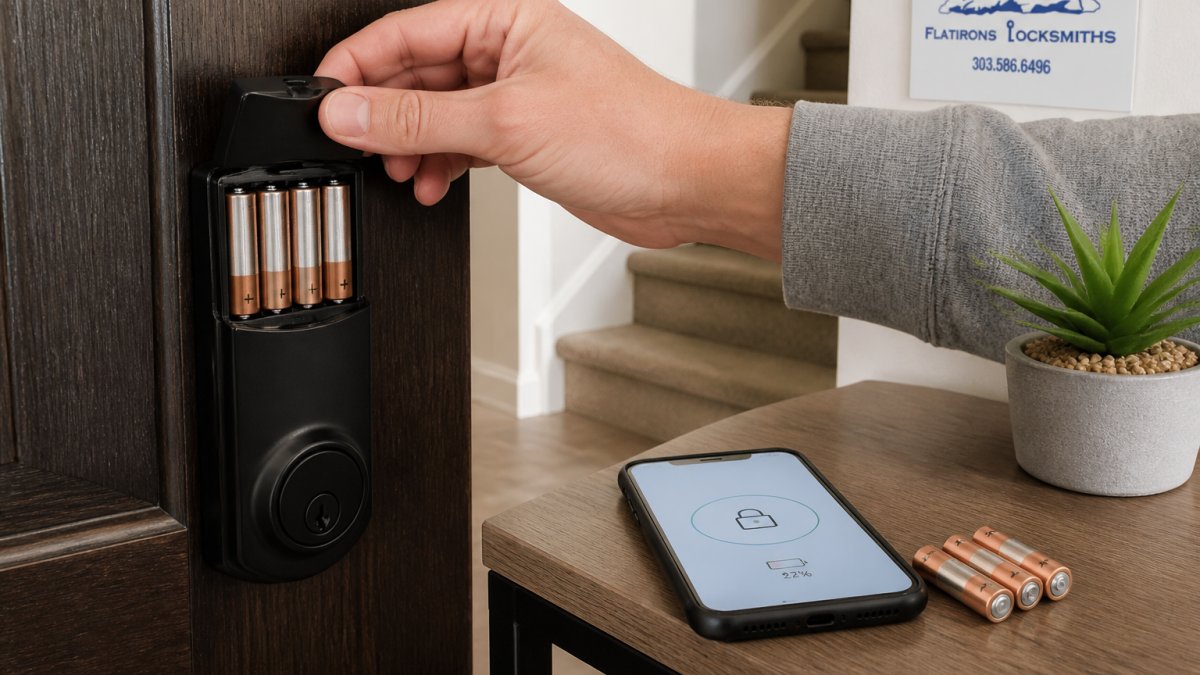
Here’s how to check battery status on common lock types:
- App-connected locks: open the app and look for the battery level percentage
- Keypad locks: watch for a blinking light or a distinct beep pattern
- Touchscreen locks: a low battery icon appears on the screen
Replace the cells within a week of the first warning. Waiting risks emergency entry hassles.
Best Batteries for Smart Locks: Alkaline vs Lithium
For most homes, quality alkaline AA batteries are the right call. They are affordable and handle moderate temperatures well. Lithium batteries cost more, but they hold capacity better in cold weather, which matters if your door faces winter wind.
What most guides miss is the compatibility caution. Some manufacturers specify alkaline only, and rechargeable cells often run at lower voltage, which can trigger false low-battery warnings. Follow the manual.
Battery Chemistry and Compatibility Cautions
Alkaline and lithium cells behave differently under load, and smart locks are a pulsed-load device: the motor draws a burst of current on each cycle, then the electronics sip power between cycles.
- Alkaline cells deliver strong initial voltage but sag under repeated high-current bursts and lose capacity faster in cold. They are the default for most locks and the safest choice when the manual does not specify otherwise.
- Lithium cells (typically lithium iron disulfide AA) maintain voltage better in cold and under load, which is why they are often recommended for exterior doors in cold climates. They cost more per cell but can outlast alkaline in those conditions.
- Rechargeable cells (NiMH) usually run at 1.2 volts per cell versus 1.5 volts for alkaline. Some locks interpret that lower voltage as a low-battery condition even when the cell is charged, producing nuisance warnings. Only use rechargeables if the manufacturer explicitly supports them.
Follow the lock manufacturer’s battery guidance exactly. Using a chemistry the lock was not designed for can void the warranty and, with some lithium cells, create a risk if the lock’s charging or monitoring circuitry is not rated for them.
Replacement Procedure and Safe Battery Handling
Replacing batteries correctly protects your settings and your lock.
- Put the lock in its manual or passage mode if the app offers one, so the door does not auto-lock while the compartment is open.
- Open the battery compartment and remove all cells at once. Do not replace one cell at a time.
- Insert a full matched set of the specified chemistry and size, observing polarity marks.
- Reassemble the compartment and test the keypad, the motor, and the app connection before closing the door.
- Confirm your access codes and schedules survived the swap. Most locks retain settings through a battery change, but verify rather than assume.
- Dispose of used cells according to local rules. Alkaline cells can often go in household trash where permitted, but lithium cells should be taken to a battery recycling drop-off. Never puncture or incinerate a cell.
A common pattern is a lock that works fine after a swap but shows a low-battery warning within days. That usually points to a mixed set, a rechargeable cell the lock does not support, or corroded contacts in the compartment.
If you are still choosing hardware, our residential door lock selection guide walks through lock types and battery needs together.
How to Make Smart Lock Batteries Last Longer
You can extend battery life without buying anything new. Start with alignment and lubrication. A bolt that slides freely draws less current than one fighting a misaligned strike plate.
Try these habits:
- Keep the deadbolt path clean and lightly lubricated
- Fix a sagging door or loose hinge promptly
- Use the keypad instead of the motor when you’re already home
Cold Weather, Door Alignment, and Motor Strain
Cold weather is the quiet killer of battery performance. Chilled cells deliver less current, and stiff hardware makes the motor work harder. The result is a lock that sailed through summer and suddenly complains in January.
Door alignment matters just as much. If your lock was installed without careful alignment, our step-by-step smart lock installation guide shows how proper fitting reduces motor strain from day one.
Troubleshooting Unusually Fast Battery Drain
A lock that burns through fresh batteries in weeks has a problem, not a personality. The usual suspects are a binding bolt, a failing motor, poor wireless signal forcing constant retries, or the wrong battery chemistry.
Work through this checklist:
- Confirm you used the battery type the manual specifies
- Check the bolt for drag or rubbing on the strike plate
- Test the door for sag or swelling in humid months
If drain continues after these steps, the issue may be connectivity rather than power. Our guide on troubleshooting smart lock connection issues helps you separate a radio problem from a battery problem.
Book a Smart Lock Battery and Hardware Check
Battery drain is usually a hardware story: alignment, strain, and fit. If your electronic deadbolt keeps eating cells, we can inspect the door, check the bolt path, and confirm the lock is installed correctly.
Flatirons Locksmiths has served homes and businesses since 2012 as a mobile service, with upfront quotes before any work begins.
Get started with Flatirons Locksmiths and schedule an appointment to keep your smart lock running on the schedule it should.
Frequently Asked Questions
How long do smart lock batteries typically last?
Most residential smart locks run six to twelve months on a set of AA batteries under normal use. Bluetooth-only keypad and fingerprint models often sit at the top of that range because the radio stays idle until you touch them. Wi-Fi models that stream remote access and lock status sit closer to the bottom. Heavy traffic doors, such as a shop entrance or a rental property, can drop below six months, so track your own change dates rather than trusting the box.
What happens if a smart lock battery dies while I’m out?
A dead battery does not usually lock you out completely. Most electronic deadbolts give a low-battery warning well before failure, then keep a reserve charge for a few more cycles. When the cells finally quit, the keypad and fingerprint reader stop responding, but the physical keyway still works. Keep the mechanical key outside the house, either with a neighbor or in a key safe, and use a portable jump pack on the exterior terminals if your model has them.
Do Wi-Fi smart locks use more battery than Bluetooth locks?
Yes, noticeably more. A Wi-Fi radio holds a live connection to your router so you can check status and unlock remotely, and that constant chatter draws power all day. Bluetooth locks only wake the radio when a paired phone is nearby. If a lock sits on a door you rarely open remotely, Bluetooth or a Z-Wave hub setup with a separate bridge will stretch battery change intervals. Choose Wi-Fi where remote access genuinely matters, and expect to swap cells sooner.
Can I use rechargeable batteries in a smart lock?
Check the manufacturer’s manual before you do. Most smart locks are calibrated for 1.5-volt alkaline cells, and nickel-metal hydride rechargeables deliver 1.2 volts, which can trigger a false low-battery warning or cause the motor to stall. Lithium AA cells hold voltage better in cold weather and last longer, but some makers warn against them because the higher initial voltage can confuse the battery gauge. Follow the spec sheet, and never mix old and new cells in the same lock.
