
Table of Contents
- Why False Alarm Triggers Happen More Than You Think
- Common Causes of False Fire Alarms and How to Stop Them
- Troubleshooting Motion Detector False Alarms Step by Step
- Residential Security System Maintenance Tips That Prevent False Alarm Triggers
- Smart Home Integration: Stop False Alarms From Connected Devices
- The Hidden Cost of False Alarms: Fines and Fees
- When to Call a Professional for Persistent False Alarm Triggers
- Frequently Asked Questions
Last Updated: September 4, 2026
Why False Alarm Triggers Happen More Than You Think
A single false alarm in the middle of the night can destroy your trust in an otherwise solid security system. These nuisance alarms are far more common than most homeowners realize, and understanding how to prevent false alarm triggers starts with recognizing that the problem is rarely the system itself. In most cases, the culprit is environmental conditions, aging hardware, or simple user error.
At Flatirons Locksmiths, we’ve responded to countless service calls where the alarm panel was fine but the sensors were dusty, a spider web was swaying in front of a motion detector, or a family member kept entering the wrong access code. The good news is that most of these issues are preventable with routine attention. We’ll walk you through the specific steps to stop these interruptions, from cleaning schedules to smart home settings, so your system works reliably when you actually need it.
Common Causes of False Fire Alarms and How to Stop Them
False fire alarms are frequently traced back to environmental conditions and poor detector placement rather than a faulty fire alarm system. Steam from a hot shower, smoke from a burnt batch of toast, and even high humidity levels near a kitchen can all trigger a smoke detector if it is positioned too close to the source.
The fix is a combination of repositioning and regular cleaning. Move detectors at least 10 feet away from cooking appliances and bathroom doors, and check that they are not near HVAC vents where dust buildup can accumulate quickly (nfpa.org). Debris accumulation inside the sensor chamber is a leading cause of nuisance alarms, so vacuum the exterior vents gently every few months. Also, review the placement of pull station covers in commercial settings; accidental activation by employees or customers is a common human error that proper covers prevent.
Troubleshooting Motion Detector False Alarms Step by Step
When a motion sensor starts triggering for no apparent reason, work through this sequence to isolate the cause:
- Check the zone configuration. Verify the sensor is assigned to the correct arming mode and that its sensitivity setting has not been changed accidentally.
- Inspect the mounting position. A sensor that has shifted slightly can now “see” a heat source like a radiator or a window with direct sunlight.
- Look for moving objects. Loose curtains, helium balloons, or a large pet walking through the detection area can all cause a false trigger.
- Clean the lens. A thin film of dust or a cobweb over the lens scatters infrared energy and mimics movement.
- Test the battery. Low voltage can cause erratic behavior and phantom signals.
- Perform a walk test. Arm the system and walk through the zone slowly to confirm the detection pattern matches the room layout.
If the sensor still fails after these steps, the device may need recalibration or replacement.
The Pet Problem: Why Your Dog Is Setting Off the Motion Sensor
One of the most frustrating and under-diagnosed causes of false alarms is a household pet. Standard motion sensors detect infrared heat and movement, and a 60-pound Labrador trotting through the living room emits a heat signature large enough to trip the detector. This is not a malfunction; it is a physics problem.
Here is how to solve it without locking your dog out of the house:
- Check for a pet-immune setting. Many modern sensors, such as those from Honeywell and Bosch, include a pet-immune mode that ignores heat signatures below a certain weight threshold, typically 40 to 80 pounds. This is not a simple on/off toggle; it requires adjusting the sensor’s lens or mounting height to create a “dead zone” below the detection beam.
- Adjust the mounting height. A sensor mounted at 6 feet with a downward-looking lens can be angled to skip the lower 3 feet of the room. This creates a blind spot for pets while still detecting a standing adult. Most manufacturers recommend a minimum mounting height of 6.5 feet for pet-immune setups.
- Understand the limits. Pet immunity is not perfect. A dog jumping on a couch or a cat leaping onto a counter can still trigger the sensor because the heat signature enters the detection zone above the floor. If your pet is a climber, you may need a sensor with a more precise lens, such as a dual-element or quad-element detector that requires two separate heat signals before triggering.
- Test with your actual pet. After adjusting the sensor, arm the system and have someone walk the pet through the room at its normal pace. Repeat the test with the pet running, as a fast-moving heat source can sometimes defeat pet-immune logic.
Pet-immune sensors are not a substitute for proper placement. A sensor pointed directly at a sunny window or a heat vent will still false alarm regardless of the pet setting.
If you have a pet and your motion sensor continues to false alarm, the issue is almost always a mismatch between the sensor’s detection pattern and your pet’s movement habits. A professional can install a pet-immune sensor with the correct lens for your specific floor plan and pet size.
Residential Security System Maintenance Tips That Prevent False Alarm Triggers
A regular maintenance routine is the single most effective way to reduce nuisance alarms. Unlike a one-time fix, system maintenance addresses the gradual degradation that causes intermittent problems. Start by testing every sensor and contact once a month using your panel’s test mode, and replace batteries in detectors and sensors on a set schedule rather than waiting for a low-battery chirp.
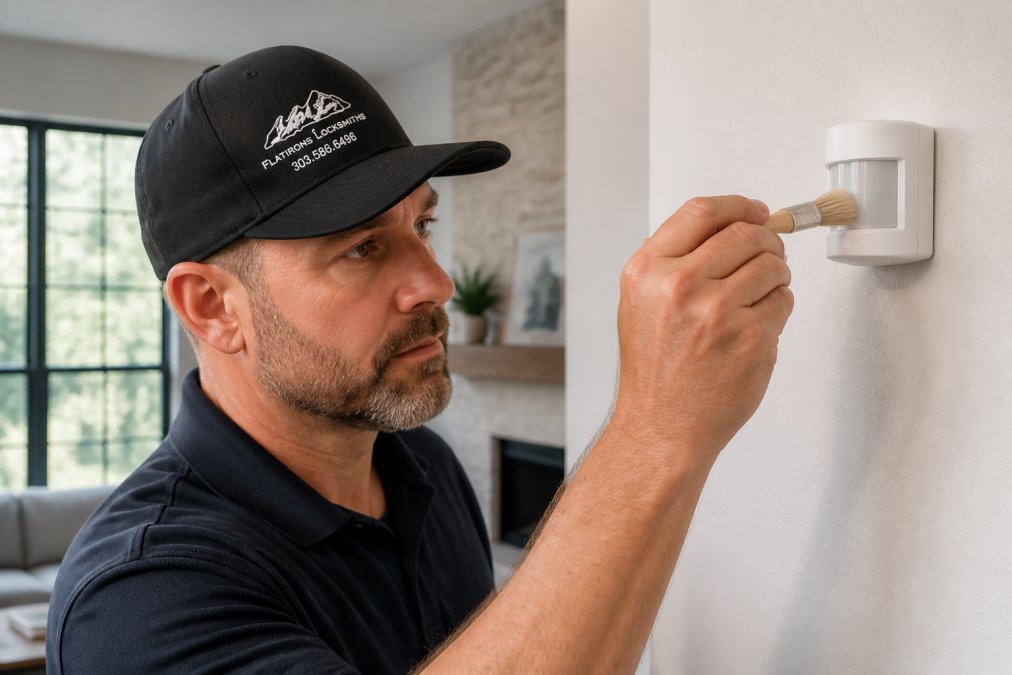
Dust buildup is the enemy of reliable detection. Use a soft brush attachment on a vacuum to clean sensor vents and avoid spraying cleaning chemicals directly on the devices, as residue can interfere with detection. Keep the areas around sensors clear of clutter, and check that furniture has not been moved into the path of a motion detector. These residential security system maintenance tips also include verifying that your access codes are current; an old code in the hands of a former houseguest is a recipe for accidental disarms and subsequent false dispatches.
The Battery Trap: Low-Battery Chirps vs. Actual False Alarms
A common source of confusion is the low-battery chirp. Many homeowners mistake these periodic beeps for a false alarm and either disarm the system or ignore them entirely. Understanding the difference is critical:
- Low-battery chirps are a single, short beep every 30 to 60 seconds, often coming from the sensor itself or the keypad. They are a maintenance request, not an alarm event. The system will not dispatch authorities for a low-battery chirp.
- Actual false alarms are full alarm events with a siren and a countdown on the keypad. These trigger a dispatch unless you disarm the system within the entry delay window.
If you hear a chirp, replace the battery immediately. But do not stop there. Here is the maintenance schedule that prevents both chirps and the phantom signals that low voltage can cause:
- Replace all sensor batteries on a fixed 12-month schedule (the American Dental Association). Do not wait for the chirp. A battery that is nearing the end of its life can cause a sensor to send intermittent signals, which the panel may interpret as an open contact or a tamper event.
- Use the exact battery type specified by the manufacturer. Many sensors require a specific lithium cell, such as a CR123A or a 3V lithium coin cell. Substituting an alkaline battery can cause voltage drops that trigger erratic behavior.
- Clean the battery contacts. Corrosion on the terminals is a leading cause of intermittent sensor failures. If you see white or green residue, clean the contacts with a dry cloth or a pencil eraser before inserting the new battery.
- Test after every battery change. Put the panel in test mode and trigger the sensor manually to confirm it reports correctly. A sensor that fails after a battery change may have a wiring issue, not a battery issue.
Keep a log of battery replacement dates on the inside of the panel door. If a sensor starts chirping sooner than 12 months, that sensor may have a power draw issue and should be inspected by a professional.
A well-maintained battery system eliminates the most common source of nuisance alerts. If you are still hearing chirps after replacing batteries, check the backup battery in the main control panel. A failing panel battery can cause the entire system to emit a low-battery tone, even when every individual sensor is healthy.
Smart Home Integration: Stop False Alarms From Connected Devices
Smart home integration adds convenience, but it also introduces new variables that can cause false alarm triggers. The most common issue is a communication delay between the smart lock, the hub, and the alarm panel. If a door is unlocked via an app but the system does not receive the disarm prompt in time, the entry delay expires and the alarm sounds.
To prevent this, ensure all connected devices are running the latest firmware and that your Wi-Fi network is stable. A frequent mistake is relying on a single Wi-Fi router that drops the 2.4 GHz band, which many security devices use. Check your automation routines in the security app; a routine that accidentally changes the arming mode when you leave or arrive can disable protection or cause an alarm. Also, disable “geofencing” if it has been unreliable, as a GPS glitch can trigger an arming or disarming event at the wrong time.
The Hidden Cost of False Alarms: Fines and Fees
Beyond the annoyance, repeated false dispatches carry real financial consequences. Many municipalities impose fines for excessive false alarms, and some jurisdictions require a permit for residential alarm systems (usfa.fema.gov). While the exact amounts vary, the structure is consistent: the first few false dispatches may draw a warning, but subsequent ones escalate quickly into fines that can reach hundreds of dollars per incident.
Police and fire departments also track false dispatch rates, and a property with a poor record may face slower response times or, in some cases, suspension of alarm response altogether. This is a strong incentive to resolve nuisance alarms promptly rather than ignoring them. Document every false alarm, note the date and possible cause, and use that log to identify patterns, such as alarms that only happen during high winds or when the HVAC system kicks on. This data is valuable when discussing persistent issues with a professional or when appealing a fine.
When to Call a Professional for Persistent False Alarm Triggers
If you have cleaned sensors, replaced batteries, and reviewed your settings but the system still produces false alarm triggers, it is time to bring in a professional. Persistent issues often point to a failing sensor, a wiring fault, or a panel configuration error that is not visible from the user interface. Attempting to fix internal wiring or advanced zone configuration without the right tools can compromise your entire security setup.
A professional technician can perform an annual inspection, test the signal strength of every device, and recalibrate sensors that have drifted out of alignment. They can also install tamper protection and verify that your system meets local code requirements. For homeowners in the north metro Denver area, Flatirons Locksmiths offers expert alarm system installation and troubleshooting. Our team handles everything from a single faulty motion sensor to a full system audit, and we provide upfront quotes before any work begins, so you know exactly what the service will cost.
| Problem | Likely Cause | Recommended Fix |
|---|---|---|
| Smoke detector alarms during cooking | Detector too close to kitchen | Relocate 10+ feet from cooking area |
| Motion sensor triggers at night | Dust on lens or spider webs | Clean lens with soft brush |
| Alarm sounds on entry but no one is there | Stale access code or app delay | Update codes; check smart home connection |
| Random low-battery chirps | Aging battery | Replace on a set schedule, not when prompted |
| False dispatch during high winds | Loose sensor or door contact | Tighten mounting and test all contacts |
Frequently Asked Questions
What is the most common cause of false alarms?
Human error is the leading cause, accounting for most nuisance alarms. Entering the wrong access code, forgetting to disarm the system before opening a door, or arming the system while a window is open all trigger alarms. Motion sensors near heating vents or direct sunlight cause many false alarm triggers as well. Learning the correct arming and disarming procedures for your specific keypad or mobile app eliminates most of these issues.
How often should I perform alarm system maintenance?
Test your system monthly and perform a thorough cleaning of sensors and detectors every three months. Dust buildup and debris accumulation are common causes of false fire alarms. Check battery life in all wireless sensors twice a year, and schedule a professional annual inspection to verify device calibration and overall system health. Regular system maintenance prevents most nuisance alarms before they start.
Can pets trigger motion detector false alarms?
Yes, pets moving through a room can trigger motion sensors, especially larger animals. Many modern motion detectors have pet immunity features that ignore movement below a set weight threshold, typically 40 to 80 pounds. If your pet causes false alarm triggers, try adjusting sensor sensitivity or repositioning the detector so it points away from pet pathways. Some systems also allow zone configuration changes to reduce coverage near the floor.
What should I do if my alarm keeps going off for no reason?
Start by checking the most common causes: low batteries, loose sensor covers, dust on detectors, and recent changes in furniture placement. For troubleshooting motion detector false alarms, move items that block the sensor’s view and adjust sensitivity settings. If nuisance alarms continue after cleaning and repositioning, contact a professional to inspect the system for wiring issues or device failure before the problem leads to false dispatch fines.
False alarms are frustrating, but they are rarely a sign that your security system has failed. Most triggers trace back to maintenance gaps, environmental factors, or configuration issues that you can resolve with a structured approach. If you have worked through the troubleshooting steps and the problem persists, professional help is the safest next step. Reach out to Flatirons Locksmiths to schedule an appointment and get your system operating reliably again.