
Last Updated: October 22, 2026
Quick Summary
A keyless entry door lock opens through a code, credential, or connected device instead of a physical key. A basic keypad deadbolt stores a PIN in its own circuitry, while a smart lock adds an app, radio, and often a cloud account. The electronics do not make the door stronger, so the bolt and strike plate still matter most.
- A standalone keypad deadbolt fails to a code you already know, while a smart lock can fail to an app needing Wi-Fi and a hub.
- A standalone keypad deadbolt on four AA alkalines commonly lasts six to twelve months, and connected smart locks often drain in three to six months.
- Check door thickness, backset, and bore hole size before ordering, since retrofit installation fails for boring reasons.
- Renters should choose a standalone keypad deadbolt that needs no account or hub and can be swapped back at move-out.
- Keep a backup key with a trusted neighbor or in a key safe, because a key stored inside the house is not a backup.
Table of Contents
- What a Keyless Entry Door Lock Actually Is
- How Keyless Door Locks Work Inside the Lock
- Types of Keyless Door Locks and Who Each One Suits
- Keyless Door Lock Security: A Realistic Threat Model
- Keyless Lock Battery Life and What Happens When Power Dies
- Door and Lock Compatibility Checklist Before You Buy
- Choosing by Household: A Plain-Language Decision Guide
- Conclusion
- Frequently Asked Questions
What a Keyless Entry Door Lock Actually Is
A keyless entry door lock opens through a code, credential, or connected device instead of a physical key.
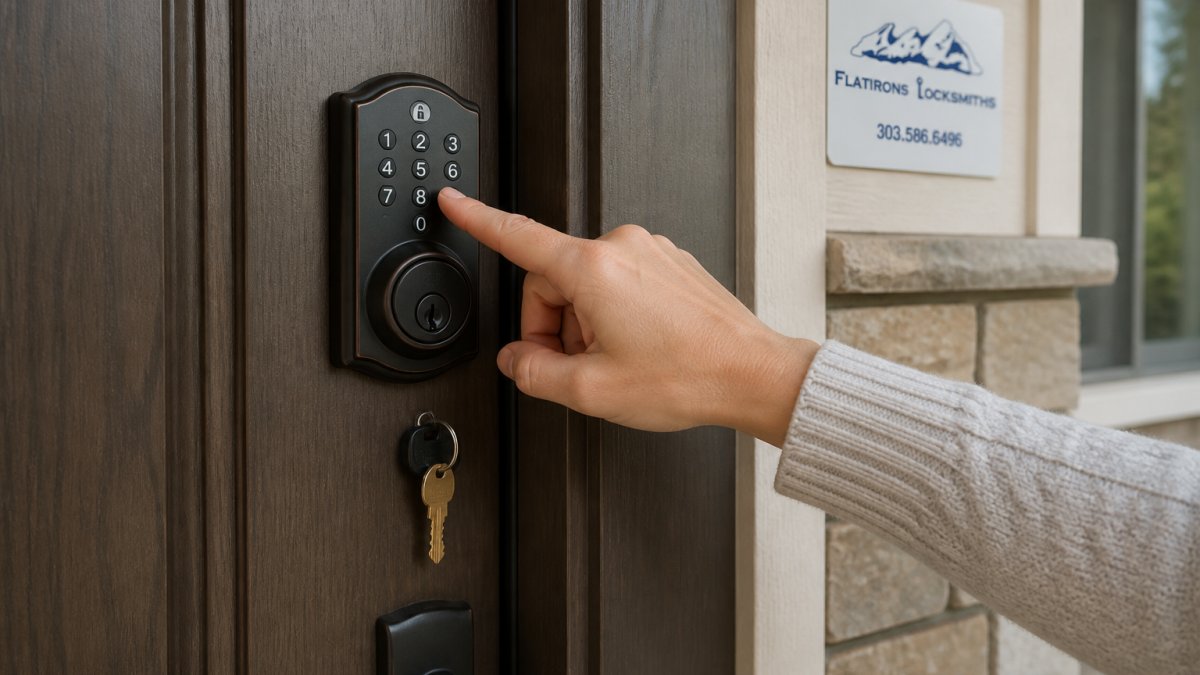
Most buying mistakes start with confusing two different products. A basic electronic keypad deadbolt stores a PIN code in its own circuitry. A smart lock adds a radio, an app, and often a cloud account, where convenience and risk both live.
Keyless Lock vs. Smart Lock: The Difference That Matters
A keyless lock is any lock operated without a physical key. A smart lock is a keyless lock that connects to a phone, network, or home automation system.
The practical difference is failure mode. A standalone keypad deadbolt fails to a code you already know; a smart lock can fail to an app that needs Wi-Fi, a hub, and a working account.
How Keyless Door Locks Work Inside the Lock
Every electronic door lock follows the same chain: credential, decision, movement.
The bolt itself is still steel. That matters, because the electronics do not make a door stronger. The ANSI/BHMA grading standards for deadbolts grade the bolt, strike plate, and cylinder, and a Grade 1 deadbolt with a keypad is still a Grade 1 deadbolt.
Ask what happens when the motor stalls. Quality electronic deadbolts let you turn the thumbturn by hand from inside even with a dead battery. Budget models sometimes lock the mechanism entirely, which turns a battery problem into a locksmith call.
Types of Keyless Door Locks and Who Each One Suits
The right type depends on who uses the door and how often.
| Type | Best For | Main Weakness |
|---|---|---|
| Keypad deadbolt | Rentals, family homes, shared entries | Code sharing gets sloppy over time |
| Smart lock with app | Remote access, guest management | Depends on network and account |
| Fingerprint lock | People who hate codes | Sensor reliability in cold or wet weather |
| Key fob or card reader | Small commercial, staff doors | Fobs get lost and copied |
Keypad and PIN-Code Locks
Keypad locks are the workhorse of the category. Most support multiple access codes so each family member or employee gets their own, plus temporary codes for a contractor or dog walker that expire on a set date.
The weakness is human. Shared codes get passed around, and a four-digit code that matches a birthday is guessable.
Smart Locks, App Access, and Fingerprint Models
Smart locks add remote access, access logs, and user permissions managed from an app. Bluetooth handles close-range unlocking; Wi-Fi or a hub enables remote control.
The honest trade-off: every connected feature is another thing that can break, and every account is another thing that can be compromised. If you want remote access, buy from a manufacturer with a clear record of firmware updates.
Keyless Door Lock Security: A Realistic Threat Model
Keyless door lock security is not better or worse than a traditional lock. It is different, and the risks move to new places.
A keypad lock defeats lock bumping and pick tools because there is no keyway to attack, but it does not defeat a cordless drill or pry bar, and no lock does.
- Code guessing: avoid repeated digits and dates; use six digits where supported.
- Tampering: a lock with an alarm or tamper alert gives you notice.
- Account security: use a unique password and turn on two-factor authentication.
The most common smart lock failure we see is not hacking. It is a homeowner who set up remote access once, never updated the app, and lost the ability to manage users when a phone was replaced. Keep the manufacturer’s app credentials somewhere you can recover them.
Keyless Lock Battery Life and What Happens When Power Dies
Battery life is the most predictable failure point on any keyless lock, and the one buyers underestimate most.
Every quality lock warns you before it dies, usually through a beep, a flashing indicator, an app notification, or a combination. Treat the first warning as a deadline: the grace period is measured in days or a few dozen cycles, not weeks.
Recovery by Failure Type
The right recovery depends on which part failed. Work through these scenarios before you need them:
- Dead battery, lock still responds: replace the batteries immediately. Keep the correct cell size on hand; many deadbolts use AA, but some use AAA or a 9-volt.
- Dead battery, lock will not respond: use the physical backup key override, usually hidden under a cap or plug on the exterior. If the model supports external power, hold a fresh 9-volt battery or USB pack against the exterior terminals to wake the lock long enough to enter a code.
- Forgotten or lost code: the interior thumbturn still retracts the bolt on most residential deadbolts, so you can exit and re-enter through another door. Regain admin access through the app or programming sequence, then delete the lost credential.
- Connectivity outage or hub failure: a smart lock that relies on Wi-Fi or a hub for remote commands should still open locally by keypad or backup key. Confirm before purchase that local access does not depend on the network.
- Jammed bolt: a misaligned strike plate or swollen door frame is the usual cause. Push or pull the door to relieve pressure on the bolt while turning the thumbturn or entering the code. If the bolt will not move, do not force the motor; call a locksmith rather than burn out the actuator.
- Lost phone: revoke the device from the app or account dashboard, then issue a new credential. If you cannot log in, use the backup key and reset the lock per the manufacturer’s instructions.
A backup key stored inside the house is not a backup. Keep one with a trusted neighbor or in a key safe, and test it before you rely on it.
What to Verify Before You Buy
Before the lock goes on the door, confirm four things: the backup key turns the cylinder smoothly, the interior thumbturn works with the batteries removed, the low-battery warning is visible or audible from outside, and the app account is recoverable if your phone is replaced. A lockout is the wrong time to discover the override was never set up.
Battery life is a maintenance schedule, not a surprise. Put a reminder on your calendar at the interval the manufacturer states, replace all cells at once, and test the backup key the same day.
Door and Lock Compatibility Checklist Before You Buy
Retrofit installation fails for boring reasons: the door is too thin, the backset is wrong, or the existing bore hole is undersized. Check these before ordering.
- Door thickness within the lock’s stated range, usually 1-3/8 to 1-3/4 inches
- Backset matches: 2-3/8 or 2-3/4 inches from door edge to bore center (Satin Nickel 665 Deadbolt – Keyed Both Sides – with Pin & Tumbler)
- You have reviewed the FTC guidance on connected product security and warranties so you know what the maker promises
If any line fails, a professional assessment is cheaper than a returned lock and a damaged door.
Choosing by Household: A Plain-Language Decision Guide
Most buying guides treat every buyer the same. The better approach is to match the lock to the people who use the door, how the door is used, and what happens when something fails.
Renters
A standalone keypad deadbolt is usually the right call. It needs no account, no hub, and no landlord permission beyond standard installation, and it can be removed and replaced with the original hardware at move-out. Avoid smart locks that require drilling new holes or wiring; they complicate the lease and the deposit.
Families and Shared Entries
A keypad deadbolt with multiple user codes covers most family homes. Give each adult a separate code so you can revoke one without changing everyone else’s, and add a temporary code for a contractor or dog walker with an expiration date. Change codes when someone moves out or a relationship changes, the same way you would rekey after collecting a key.
Older Adults and Anyone With Mobility Limits
Prioritize a smooth thumbturn, a clear emergency egress path, and a lock that opens without a code, phone, or battery from the inside. Every occupant must be able to get out in a fire. Fingerprint sensors can be unreliable for dry or worn skin, so a keypad with large buttons is often the more forgiving choice.
Short-Term Rentals and Frequent Guests
A smart lock with temporary codes and access logs earns its keep here. You can issue a code that expires at checkout, revoke access without collecting anything, and see who entered and when. The trade-off is dependence on the network and the account. Choose a model with local keypad access that works during an internet outage, and keep a backup key in a secure lockbox for the cleaning crew.
Small Commercial and Staff Doors
Keypad or card-reader access control with individual user permissions and an audit trail is the standard. Fobs get lost and copied, so prefer systems that let you disable a single credential instantly. For warehouse and back-of-house doors, confirm the lock’s weather rating and the door’s ability to anchor a reinforced strike plate.
People Who Want Offline Access
If you dislike apps or live where connectivity is unreliable, a standalone keypad deadbolt is the honest answer. It stores codes in its own circuitry, needs no account, and fails to a code you already know. You give up remote access and logs, and gain independence from Wi-Fi, hubs, and firmware updates.
Cold-Weather and Exposed Entries
Fingerprint sensors struggle with dry, cracked skin in winter, and some keypads become stiff in freezing temperatures. A keypad with a physical membrane and a backup key is more forgiving than a biometric model on an exposed door. Check the lock’s operating temperature range before you buy.
Privacy and Account Security
Connected locks may store access logs, user names, and in some cases biometric templates. Read the manufacturer’s privacy policy before purchase and confirm where data is stored and who can access it. Secure the account with a unique password and two-factor authentication, and remove users promptly when access should end.
Total Cost of Ownership
Price is not the purchase price alone. Add installation, batteries over the life of the lock, any hub or subscription the app requires, and the cost of replacement if the electronics fail outside warranty. A cheaper lock with a paid subscription can cost more over five years than a standalone keypad that needs only batteries.
Write down your household’s three most important needs before you shop: who needs access, how often the door is used, and what happens if the battery dies. The lock that fits those three answers is almost always the right one.
Conclusion
The hardest part of buying a keyless entry door lock is not the technology. It is being honest about how your household actually operates, and what happens on the day the battery dies or the app stops working.
If you would rather have it fitted and tested correctly the first time, Flatirons Locksmiths handles electronic deadbolt installation, commercial access control, and hardware repair across the north metro area.
Frequently Asked Questions
What are the downsides of keyless entry locks?
The main downsides are battery dependence, higher upfront cost than a traditional deadbolt, and electronic failure risk. You also need a plan for guests, contractors, and family members who forget codes. Physical keys can be lost, but a dead battery or a failed electronic actuator can lock out everyone at once. Most models include a low-battery warning and a backup key or manual override, so the real risk is ignoring the warning. Choose a model with a keyed override and test it before you rely on the lock.
How do keyless entry door locks work?
A keyless entry lock replaces the mechanical turn of a key with an electronic signal. You enter a PIN code, tap a key fob, use a fingerprint, or send a command from a mobile app over Bluetooth or Wi-Fi. The lock’s circuit board checks the credential against stored user permissions, then sends a small electric current to an electronic actuator or solenoid that retracts the deadbolt latch. A manual thumb turn or keyed cylinder stays inside as a fallback if the electronics fail.
Are keyless door locks secure for a home?
A quality keyless deadbolt is generally as secure as a traditional deadbolt against forced entry, because the bolt and strike plate do the physical work. The realistic risks are code guessing, shared codes that are never changed, and weak account security on app-connected models. Use unique codes per person, delete codes when someone moves out, enable two-factor authentication on the app, and keep firmware updated. Avoid simple codes like 1234 or your street number, and check for tamper alarms on the model you buy.
What happens if a keyless door lock loses power?
Most keyless locks run on AA batteries and give a low-battery warning weeks before failure. When power does die, nearly every residential model has a backup: a keyed cylinder under a cover, a hidden manual override, or a temporary 9-volt jump terminal on the exterior. If you are locked out, a locksmith can open the door without damage. The real failure to plan for is a dead battery plus a lost backup key, so store the backup key somewhere off-site and replace batteries on a schedule.
Can you still use a key with a keyless door lock?
Yes, on most residential keyless deadbolts. The keyed cylinder is usually hidden behind a small cover or sits below the keypad, and it exists so you are never fully dependent on batteries or electronics. Some budget models are keyless-only, which is why checking the spec sheet matters. If a keyed override is important to you, confirm it before purchase. A locksmith can also rekey that cylinder so one key works across your doors after installation.
What is the difference between a keyless lock and a smart lock?
A keyless lock is any lock you open without a physical key, including a basic digital keypad deadbolt. A smart lock adds network connectivity: Bluetooth, Wi-Fi, or a hub, plus a mobile app for remote access, temporary codes, access logs, and smart-home integration. Every smart lock is keyless, but not every keyless lock is smart. If you only need code access for family and guests, a standalone keypad lock costs less and has fewer things to fail. If you want remote access and audit trails, choose a smart lock.
How long does a keyless lock battery last?
Most residential keyless deadbolts run four to twelve months on a set of AA batteries, depending on how often the lock is used and whether it maintains a Wi-Fi connection. Bluetooth-only models typically last longer than Wi-Fi models because the radio stays off until needed. Cold weather shortens battery life, which matters in Colorado winters. Replace batteries at the first low-battery warning rather than waiting, and keep a spare set in the house.
Will a keyless lock fit my existing door?
Most keyless deadbolts are designed as retrofit installations for standard doors with a 1-3/8 to 1-3/4 inch thickness and a 2-1/8 inch bore hole. Check three measurements before buying: door thickness, backset (2-3/8 or 2-3/4 inches), and the cross bore position. Doors with unusual prep, metal frames, or glass panels may need different hardware. A locksmith can confirm compatibility and handle installation so the bolt lines up with the strike plate cleanly.