
Table of Contents
- Smart Lock Installation for Homeowners: What to Expect
- Tools and Materials Required for Installation
- Smart Lock Communication Protocols: WiFi vs. Bluetooth vs. Z-Wave
- Step 1: Removing the Existing Deadbolt and Measuring Your Door
- Step 2: Installing the New Latch and Strike Plate
- Step 3: Mounting the Exterior Keypad and Interior Assembly
- Step 4: Connecting the Data Cable and Powering Up
- Step 5: Calibrating the Lock and Home Automation System Integration
- Frequently Asked Questions
Last Updated: September 7, 2026
Smart Lock Installation for Homeowners: What to Expect
Smart lock installation is the process of replacing a traditional deadbolt with an electronic locking system that grants access via keypad codes, smartphone apps, or biometric scanners instead of a physical key. For most homeowners, this is a manageable DIY upgrade that takes between 30 and 90 minutes with basic tools (thisoldhouse.com).
The most common mistake homeowners make isn’t technical. It’s buying a lock before understanding how it will communicate with the rest of their setup. That single decision determines whether your new lock works seamlessly or becomes a frustrating island of automation.
Below, we’ll walk through the full smart lock installation process step by step, including the communication protocols that decide compatibility, the exact tools you need, and the calibration steps most guides skip.
Tools and Materials Required for Installation
Before opening any packaging, gather everything you’ll need. Most smart locks ship with the mounting hardware, latch assembly, and installation template, but you’ll still need a few standard items.
- Phillips-head screwdriver (a magnetic tip helps with tiny screws)
- Tape measure for verifying door thickness and backset
- Pencil for marking drill points
- Drill with 1/8-inch bit (only if you need pilot holes)
- Smartphone with the manufacturer’s mobile application downloaded
- Fresh batteries (most locks require 4 AA batteries)
- Flashlight for inspecting the door edge
Door thickness and backset determine whether a lock fits. Standard US doors are 1-3/8 or 1-3/4 inches thick, while the backset is typically 2-3/8 or 2-3/4 inches. Most smart locks include an adjustable latch that accommodates both backsets, but verify your measurements against the manufacturer’s specifications before purchasing.
Smart Lock Communication Protocols: WiFi vs. Bluetooth vs. Z-Wave
Smart lock communication protocols determine how your lock connects to your phone, your smart home hub, and the internet. This is the decision that shapes everything else, so it deserves attention before you buy.
WiFi locks connect directly to your home network, enabling remote access and notifications without additional hardware. They’re the simplest to set up but consume more battery because maintaining a constant WiFi connection draws power continuously.
Bluetooth locks pair directly with your phone and offer excellent battery life, sometimes a year or more per set of batteries. The tradeoff is range: you must be physically near the lock to control it, and remote access typically requires a separate WiFi bridge or hub.
Z-Wave and Zigbee locks use low-power mesh networking designed for home automation. They don’t connect to your phone directly. Instead, they communicate through a smart home hub like Hubitat, SmartThings, or a system from Control4. This makes them ideal if you’re building a comprehensive automation setup where the lock needs to trigger other devices.
The right choice depends on your existing ecosystem. If you already run a smart home hub, a Z-Wave or Zigbee lock integrates more cleanly than a WiFi model. If you want simple phone control without extra hardware, WiFi or Bluetooth is the more practical route.
Step 1: Removing the Existing Deadbolt and Measuring Your Door
Start by removing the two screws on the interior side of your existing deadbolt. These are typically located on the mounting plate behind the thumb turn. Once removed, the interior assembly slides off, exposing the latch mechanism.
Unscrew the latch plate on the door edge and pull the latch assembly out. Then remove the strike plate from the door frame. You should now see the edge bore hole and the main bore hole where the lock body sits.
With the old hardware removed, take your measurements. Confirm the door thickness and backset match what your new lock requires. Most smart locks include an installation template in the box. Hold it against the door to verify the bore hole alignment before proceeding.
Step 2: Installing the New Latch and Strike Plate
Insert the new latch assembly into the edge bore hole with the beveled side facing the direction the door closes. Secure it with the two screws provided, but don’t overtighten, as this can warp the latch housing.
The strike plate is where most installations encounter trouble. If the door frame is misaligned, the latch won’t seat properly, causing the lock to bind or the door to rattle. Test the alignment by closing the door and observing whether the latch engages cleanly.
Fixing Door Misalignment and Strike Plate Issues
Most installation guides assume your door and frame are perfectly aligned. In reality, especially in homes older than 20 years, settling and seasonal wood movement can shift the door frame by fractions of an inch, enough to cause the latch to miss the strike plate opening or bind. This is critical with the smart locks as they must be aligned with the strike plate or they will not lock, let alone unlock when you want and if you are not there to catch it not locking then your door will not be secure.
Here’s how to diagnose and fix the most common alignment problems:
The latch doesn’t reach the strike plate opening. If the latch hits the edge of the strike plate, the door frame has shifted. Check the gap between the door and frame. If uneven, tighten the hinge screws or add a thin shim behind a hinge leaf. If the gap is even but the latch still misses, the strike plate may need to be moved.
Moving the strike plate. Remove the strike plate and hold it where the latch naturally lands. Mark the new screw holes. If the new position overlaps the old holes, fill them with wooden toothpicks coated in wood glue. Let the glue dry, snap off the toothpicks flush, drill new pilot holes with a 1/8-inch bit, then reinstall the strike plate.
Enlarging the strike plate opening. If the latch engages but binds or scrapes, the opening is too small. Remove the strike plate and use a metal file to enlarge the opening slightly in the direction of the misalignment. File a little at a time and test frequently, removing too much metal weakens the strike plate’s hold on the latch.
Deepening the latch pocket. If the latch doesn’t fully extend into the frame, the recess behind the strike plate may be too shallow. This is common in older doors where the frame has been painted multiple times. Use a chisel to deepen the recess by 1/16 to 1/8 inch, then test the fit.
Checking the Door’s Fit Before Finalizing
After adjusting the strike plate, close the door and check the overall fit. The door should close smoothly without needing a shoulder bump. The latch should slide into the strike plate opening with a clean, solid click. If the door sags or rubs against the frame, address that before proceeding to the next step.
For doors that are significantly out of square, a professional locksmith can re-mortise the strike plate or adjust the hinges for a precise fit. This is especially important for smart locks, which rely on smooth mechanical operation to trigger their electronic sensors correctly.
Reinstall the strike plate and test the latch engagement several times before moving on to mounting the exterior assembly.
Step 3: Mounting the Exterior Keypad and Interior Assembly
The exterior keypad mounts first. Feed the data cable through the center hole in the door, then position the keypad over the bore hole, ensuring it sits flush against the door surface. Secure it with the mounting screws provided.
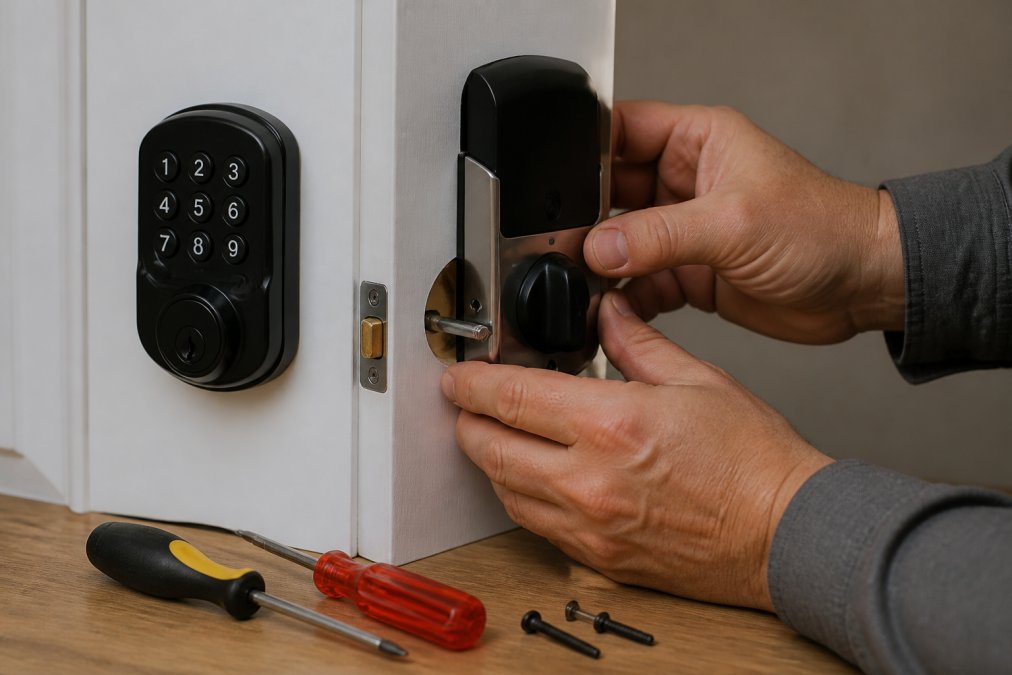
On the interior side, connect the data cable to the corresponding port on the interior assembly. This connection is delicate, so handle it gently. A bent pin or forced connection is a common cause of locks that power on but fail to communicate.
Align the interior assembly over the mounting screws and press it firmly against the door. Tighten the screws in a crisscross pattern to ensure even pressure. The interior assembly should sit flush with no gaps.
Step 4: Connecting the Data Cable and Powering Up
With the interior assembly mounted, insert the batteries according to the polarity markings. Most smart locks use four AA batteries, and the battery compartment is typically located behind a removable cover on the interior assembly.
Once the batteries are installed, the lock should power on automatically. Look for a status light or audible beep confirming the system is active. If nothing happens, remove the interior assembly and verify the data cable connection.
Install the battery cover and test the lock manually using the thumb turn. The latch should extend and retract smoothly. Then test the keypad by entering the default code from the manufacturer’s manual.
Step 5: Calibrating the Lock and Home Automation System Integration
Calibration is the step most DIY guides skip, and it’s the difference between a lock that works and one that works reliably. Most smart locks require a calibration routine that teaches the motor the full range of latch travel. This is typically initiated through the manufacturer’s mobile application after the lock is powered on.
Follow the app prompts to run calibration, then test the lock several times using the keypad, the app, and the physical key. If the latch binds or the motor strains, recalibrate or check the alignment of the latch and strike plate.
Securing the Lock on Your Network
Once the lock is calibrated and paired, the next step is securing its digital presence on your home network. A smart lock needs basic hygiene to prevent unauthorized access, yet most homeowners skip this (cisa.gov).
Here’s what a professional locksmith checks that most DIY guides omit:
- Change the default admin credentials immediately. Many locks ship with a default admin code or a temporary setup PIN. If you don’t change it during initial setup, anyone who reads the manual can gain access.
- Enable two-factor authentication (2FA) on the companion app. This adds a second verification step, usually a code sent to your phone, when logging in from a new device. It prevents someone who obtains your password from controlling the lock.
- Turn on automatic firmware updates. Lock manufacturers regularly patch vulnerabilities. A lock that never updates is a lock with known, exploitable weaknesses. Check the app’s settings to ensure updates install automatically.
- Use a dedicated IoT network or guest network. If your router supports it, place smart home devices on a separate network from your primary computers and phones. This contains a potential breach and prevents a compromised lock from reaching other devices on your network.
- Disable remote access if you don’t need it. If you only control the lock via Bluetooth when you’re home, turn off WiFi remote access. Every open connection is an attack surface.
Integrating with Your Home Automation Ecosystem
Home automation system integration comes next. If your lock uses Z-Wave or Zigbee, pair it with your smart home hub by putting the hub into pairing mode and triggering the lock’s pairing sequence. For WiFi locks, the app will guide you through connecting to your network.
The integration options depend on your hub’s capabilities. For example, a Z-Wave lock can trigger a scene: when the door unlocks after 6 PM, the entryway lights turn on and the thermostat adjusts. A Zigbee lock might pair with a door sensor to alert if the door is left ajar.
The most common integration failure we see is homeowners buying a lock first and then trying to force it into an existing ecosystem. A Z-Wave lock won’t talk to a hub that only supports Zigbee. This is why we strongly advise consulting a professional locksmith before purchasing any home automation equipment.
Once calibrated and secured, configure your access codes, enable auto-lock if desired, and set up alerts for unusual activity. These settings are managed through the app and can be adjusted anytime.
Frequently Asked Questions
Can I install a smart lock myself, or do I need a professional?
Many homeowners can handle smart lock installation if the door is pre-drilled for a standard deadbolt and is properly aligned. The process involves removing the old lock, fitting the new latch, and mounting the assemblies. However, if your door has non-standard dimensions, is misaligned, or you are unsure about the smart lock communication protocols that will work best in your home, a professional locksmith can ensure a secure and correct installation the first time.
What is the difference between WiFi, Z-Wave, and Zigbee smart locks?
WiFi locks connect directly to your home network and usually offer the simplest setup with remote access, but they can drain batteries faster. Z-Wave and Zigbee locks use a mesh network and require a separate smart home hub, but they are often more reliable and have longer battery life. Your choice should depend on your existing home automation system integration and whether you already have a compatible hub.
What security features should I look for in a smart lock?
Look for a lock with a solid ANSI Grade 1 or 2 rating for physical security. Digital features like two-factor authentication, auto-lock, and a low battery indicator are important. For network security, choose a lock that supports encrypted communication and regular firmware updates. Also, verify the lock has an emergency override, such as a physical key and external power terminals, in case the battery dies.
How do smart locks integrate with existing home automation systems?
Integration depends on the communication protocol. Many smart locks work with major platforms like Amazon Alexa, Google Home, or Apple HomeKit over WiFi. For systems using Z-Wave or Zigbee, the lock needs to pair with a compatible smart home hub. Before buying new smart home equipment, consult a professional locksmith to confirm the lock will communicate correctly with your current setup and build a system that works together well.